GoodTrust vs. Trustworthy Digital Vault: How They Compare
Trustworthy's Family Operating System® automatically organizes your most important information and turns it into answers, guidance, and action.
Not everybody prioritizes planning for the future. For example, less than half of Americans over the age of 50 have a will.
However, estate planning is absolutely critical, no matter how old you are. It safeguards your legacy, future-proofs your family, and ensures there are clear instructions to make things easier for loved ones after you die.
A digital vault can help you streamline your estate planning, and there are a few options on the market today. To help you make sense of those options, let’s break down the features of two industry leaders: Trustworthy and GoodTrust.
Read on to see why Trustworthy is a better choice than GoodTrust in terms of security, price, customer support, collaborative features, and more.
Let Trustworthy Handle the Hard Part of Organizing
Trustworthy helps maintain your family’s documents so your system stays up to date.
What Is Trustworthy?
Trustworthy's Family Operating System® is designed to help users organize, optimize, and protect their important family documents.
Unlike other digital vaults, Trustworthy supports a range of next-level features that enable families to get organized quicker — including AI-powered instant organization, smart suggestions, customizable templates, intelligent reminders, access to Trustworthy Certified Experts™, and more.
What Is GoodTrust?
GoodTrust is an estate planning platform that focuses on helping individuals set up digital wills, trusts, and directives.
After drafting estate planning documents, users can upload them into GoodTrust’s digital vault. From there, users can share those documents with loved ones and set up extra estate planning features like issuing instructions to delete or memorialize social media accounts.
You can probably already tell that GoodTrust and Trustworthy are pretty different. So, let’s break down some key features and look at how they stack up against each other.
Compare Trustworthy vs. GoodTrust
Table Cell 1
Trustworthy
GoodTrust
Security
AES 256-bit encryption
Available
Available
Multi-factor authentication
Available
Available
Tokenization
Available
Not available
On-screen redaction
Available
Not available
Biometric authentication
Available
Not available
Advanced threat detection
Available
Deploys user entity behavior analytics, alerting users to unusual or suspicious activity
Not available
Hardware key support (e.g., YubiKey)
Available
Included with Gold and Platinum plans
Not available
Compliance
SOC 2 Type II
Compliant
Not compliant
SOC 3
Compliant
Not compliant
EU General Data Protection Regulation
Compliant
Not compliant
California Consumer Privacy Act
Compliant
Not compliant
HIPAA
Compliant
Not compliant
Automation
Instant account organization
Available
Structured system automatically connects your people, documents, accounts, and assets so household information works together
Household data stays organized automatically as new documents and other information are added
Autopilot extracts key information from documents
Not available
Inbox Autopilot
Available
Automatically uploads and organizes important documents from your Gmail account, keeping your family's information up to date
New documents are automatically connected to related information in your account
Not available
Recommendation engine personalizes your account
Available
Not available
Automated expiration and renewal reminders
Available
Autopilot scans documents for deadlines and other important dates, and automatically sends reminders
Not available
AI-generated document summaries
Available
Not available
AI-powered document categorization prompts
Available
Not available
AI-powered file-name suggestions
Available
Not available
Automated backups
Available
Available
More Curation Features
Mobile document scanning
Available
Android and iOS mobile scanner captures and auto-fills information for you
Not available
Desktop scanner integration
Available
Compatible with Ricoh ScanSnap scanners
Not available
Chrome extension
Available
Lets you save Gmail attachments, local files and screenshots directly to your account
Not available
Email forwarding to account inbox
Available
Not available
Drag-and-drop uploading
Available
Not available
Collaboration & Sharing
Number of collaborators
Unlimited
Unlimited collaborators with Platinum plan
Limit varies by price tier
Not available
Granular permissions
Available
Partial, full, and legacy access
Category- and document-level sharing
SecureLink™ sharing with expiration and access settings
Limited
Contacts can get access to individual documents
Timed access available
Activity feed
Available
Not available
Upload and update requests
Available
Not available
Document Storage
Unlimited storage
Available
Unlimited storage with paid plans
Limited
Storage limited to only 10 GB
Mobile App
iOS
Available
Not available
Android
Available
Not available
Customer Support
Mobile offline mode
Available
Household information can be accessed without internet; for times when connectivity is limited
Not available
Information downloads
Available
Not available
Customer Support
Support channels
Email, chat, phone
Hands-on customer support with paid plans
Support features vary by price tier
Email only
Additional expert support
Trustworthy Certified Experts™
Personalized support — remotely or in person — for organizing your account, or an entire account setup done by an Expert
Available with all paid plans
Three hours of support included with Platinum subscription
Not available
Content library
Available
Large library of content with advice on important life moments
Limited
Small content library
Help center content
Available
Available
Product discounts
Available
Marketplace of recommended products and services (with paid plans)
Not available
Pricing
Free starter plan
Available
Not available
Paid plans
Available
Silver plan: $10/month
Gold plan: $20/month
Platinum plan: $40/month
Billed annually
Available
Only one plan, $149 a year
After first 12 months, $39 a year to continue making updates
Subscriber discounts
Available
50% military and community hero discount on Silver and Gold plans
Limited
Discounts for affiliate partners
Trustworthy Offers Comprehensive Family Management
Both Trustworthy and GoodTrust enable you to upload important family documents. But GoodTrust is much more limited in scope.
GoodTrust’s main focus is estate planning. They have pathways for new users to set up a digital will or trust, and they support you with other estate documents like directives, financial powers of attorney, or pet trusts.
If you’re only looking for a place to store your estate plan, that might be enough. But life admin stretches way beyond just estate documents. That’s why Trustworthy comes out on top in this department.
Get Organized Without Doing All the Work Yourself
With Trustworthy, your family's documents are secure, organized, and ready to use.
Trustworthy offers a range of tools to help you get organized in all aspects of family life, whether it’s legal matters, financial information, personal information, or even just important memories like old photos.
And because all of Trustworthy’s paid plans include unlimited document storage, you’ve got scope to upload anything and everything important to you and your family.
Document Organization Made Simple
One element that really makes Trustworthy stand out is the simplicity of onboarding your documents.
Trustworthy offers a range of organization templates and predefined categories that prompt you to upload certain documents. You can get a prompt if you forget to upload something important, like your home insurance policy, which means nothing gets lost or overlooked.
Everything about Trustworthy is designed to take the friction out of digital organization. It keeps your household information organized without requiring you to build or maintain a system yourself. Its structured platform automatically connects your people, documents, accounts, and assets so everything works together as a cohesive whole.
As new information is added, it’s automatically organized in the background, while Autopilot extracts key details from your documents to keep everything accurate and up to date.
With Inbox Autopilot, that organization extends to your email as well. Important documents from your Gmail account can be automatically uploaded, categorized, and connected to the rest of your account, ensuring new information is continually integrated without manual effort.
GoodTrust’s digital vault is functional, but it’s not as structured.
When launching a new account with GoodTrust, you can opt to start by setting up a will or a trust. But your digital vault itself lacks structured categories, which means the process of getting organized and finding what you need is a longer, manual process.
Easy Family Collaboration vs. Basic Sharing Tools
When choosing a digital family vault, a key feature is collaboration. How can you control who has access to key documents and when they get to look at them?
GoodTrust lets you assign trusted contacts to access each document you upload. Once you’ve added a new contact to your account, you can control their access using a simple toggle system that grants them access now, after your death, or never.
Trustworthy’s role-based permissions are a little bit more advanced.
After setting up a Trustworthy account, you can onboard an unlimited number of collaborators. Those can be full-access collaborators (who can access everything in your vault) or partial-access collaborators (whose access is limited to certain sections or folders in your vault). Trustworthy also offers legacy access, for those people who would need to get into your account after your death.
This is ideal if you’ve got a folder for estate planning that you want to share with your attorney, another folder for tax returns to share with your accountant, and a folder with insurance information you want to share with your spouse.
But you can also grant granular, one-off access to anyone you want to see certain files with Trustworthy’s SecureLinks™ feature.
SecureLinks™ enable you to set up unique, view-only access links to specific items in your Trustworthy vault. You’re then able to share those links with anyone, and you can even set up a time limit for access. Trustworthy sends push notifications when your recipient accesses a file or the link expires, and you can revoke access whenever you want.
Because its collaborative features are so much more advanced, Trustworthy definitely finishes first in this category.
Make Organization Easier With Built-In Support
Trustworthy helps manage your family's information so you don’t have to track everything.
Trustworthy’s Advanced Security Offers Peace of Mind
The security protecting your digital vault needs to be top-notch, and while GoodTrust has satisfactory security, Trustworthy is a lot more advanced in terms of extra safety features.
Everything you upload to your GoodTrust vault uses AES 256-bit encryption to ensure all your personally identifiable data is protected. GoodTrust also supports multi-factor authentication to protect against unauthorized access.
Trustworthy has all of that and a whole lot more.
Trustworthy uses AES 256-bit encryption and multi-factor authentication, too. But with Trustworthy, you can also use biometric authentication and physical security keys to take your account security to the next level.
Next, there’s Trustworthy’s tokenization security feature. Not familiar with tokenization? It’s a smart security feature that removes sensitive data from the Trustworthy app and then replaces it with a unique token. That means your data is always separate from your account and totally secure.
Keep Everything Organized Without Constant Effort
Manage, secure, and share your documents in a system built for families.
Finally, there’s Trustworthy’s advanced threat detection. Trustworthy uses advanced behavior analytics to keep an eye on unusual activity so that users are notified immediately if anything seems amiss.
But don’t just take our word for it — Trustworthy has the compliance certificates to prove it.
Trustworthy is compliant with the California Consumer Privacy Act (CCPA), General Data Protection Regulation (GDPR), and Health Insurance Portability and Accountability Act (HIPAA). It also has a SOC-2 Type II and SOC-3 certification.
That’s miles above industry standards in terms of digital security.
Support That Puts Families First vs. Self-Service
When it comes to customer support, Trustworthy goes the extra mile.
GoodTrust offers customer support only via email — so if you want to get help, you’ll have to wait. Meanwhile, Trustworthy's Silver and Gold plans offer customer support via both email or chat. And if you’re looking for next-level support, you can get access to a Trustworthy Certified Expert™.
Trustworthy Certified Experts™ are professionals who offer personalized, one-on-one support. They can help Trustworthy users with onboarding documents and creating digital organization strategies, or even helping families choose the right lawyer or pick appropriate insurance plans.
GoodTrust’s platform doesn’t have that. It’s more about self-service, which is fine if you know exactly what you’re doing all the time. But most of us don’t, so personalized support is a major selling point.
That’s why Trustworthy wins in terms of customer service and support.
Trustworthy’s Estate Planning Integration Is Top-Notch
Both Trustworthy and GoodTrust support individuals with estate planning. However, GoodTrust’s focus is pretty narrow, while Trustworthy’s approach is more holistic.
GoodTrust was founded around the idea that individuals should be working to share their digital legacy and provide clear instructions for how that legacy should be maintained after death.
That’s why its platform focuses primarily on creating digital wills or trusts — with additional support around other estate planning tools like powers of attorney, health directives, and pet directives. One cool legacy feature of GoodTrust is that you can record yourself talking about memories for loved ones to enjoy when you’re gone.
These are all important aspects of estate planning, and once you set them up, you can upload them to your GoodTrust vault.
But Trustworthy goes beyond your run-of-the-mill planning documents to look at broader family organization.
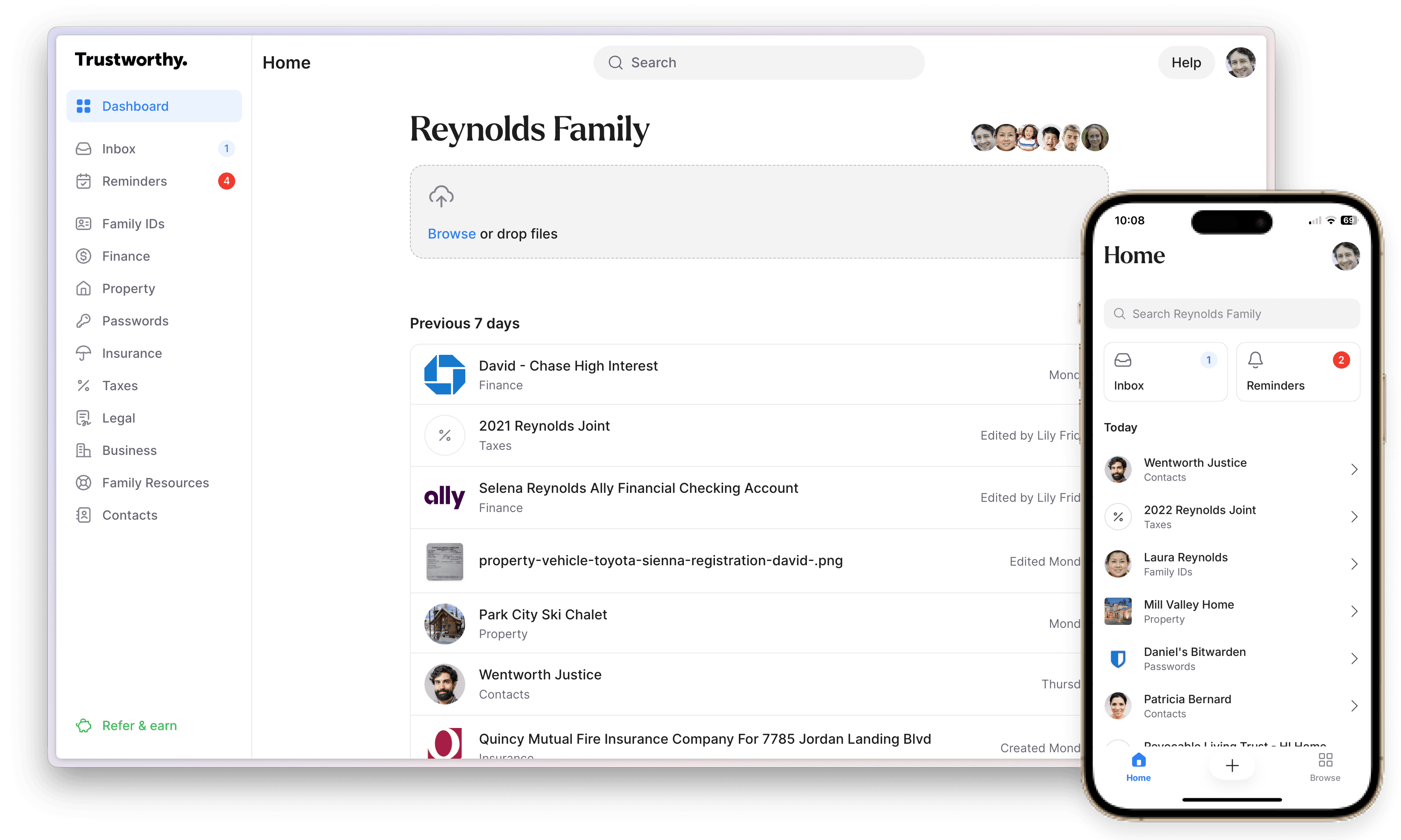
Trustworthy enables you to store wills, trusts, and advance directives, too. But with uncapped storage, you can also upload and organize all the other important documents in your life.
We’re talking about everything:
Insurance policies
Legal documents
Family IDs
Business contracts
Financial information
Tax information
Medical records
Property information
Passwords
Contacts
And that’s just for starters. If it’s important to you, you can upload it to your Trustworthy vault.
From there, you can use templates to populate different categories so your digital vault is simple to navigate, meaning everything is where it should be, and your loved ones can find everything they need after you’re gone.
Trustworthy Gives You More for Your Money
The final piece of the puzzle is price.
We’ve already pointed out that GoodTrust offers a fairly basic service, which is why they offer a basic price. GoodTrust offers one plan priced at $149. After 12 months, you’ll then get charged $39 per year if you want to make any updates to what you’ve placed in your digital vault.
But if you’re looking for more flexibility and choice, Trustworthy’s range of plans might be the better option.
Trustworthy offers a 100% always-free plan for new users to test the waters. And if you do opt for a paid plan, there’s a 30-day money-back guarantee.
Trustworthy's paid plans include unlimited storage:
Silver: $10 a month (billed annually).
Gold: $20 a month (billed annually).
Platinum: $40 a month (billed annually), which includes three hours of access to Trustworthy Certified Experts™.
Trustworthy also offers 50% Silver and Gold discounts to firefighters, police, paramedics, EMTs, doctors, nurses, active-duty military personnel, reservists, veterans, teachers, and security guards.
You might pay more for Trustworthy's Family Operating System® than you’d pay for GoodTrust. But Trustworthy offers AI-powered organization features, better security, superior customer support, a wider range of document categories, unlimited storage, access via app and Chrome extension, support from Trustworthy Certified Experts™ — the list goes on and on.
At the end of the day, you get what you pay for.
Trustworthy Is the Better Choice for Families
GoodTrust is a decent digital legacy tool if you’re looking for a way to set up and store your will or a trust. But life can be pretty complicated, and so a lot of families need more in a digital vault. That’s why Trustworthy is the clear winner here.
Trustworthy offers a wider range of choices when it comes to plans, a broader range of features, and a more personalized approach when it comes to customer support. Not only can Trustworthy help with estate planning, but it also supports you with your day-to-day.
That’s why Trustworthy is the better choice for families in need of a more holistic approach.
So, are you ready to learn more? Check out Trustworthy’s range of features and set up a free account to discover how the Family Operating System® can help your family get (and stay) organized.
Key Takeaways
How do Trustworthy and GoodTrust differ at a high level?
GoodTrust centers on estate planning and digital wills.
Trustworthy provides a full family-management system covering legal, financial, medical, personal, and archival information with far broader capabilities and unlimited storage on paid plans.
How do their security and compliance standards compare?
Both use AES 256-bit encryption and multi-factor authentication.
Trustworthy also includes tokenization, biometric authentication, optional physical security keys, advanced threat detection, and compliance with SOC 2 Type II, SOC 3, GDPR, CCPA, and HIPAA. GoodTrust does not.
Do Trustworthy and GoodTrust offer the same organizational features?
No. Trustworthy keeps your household information organized without requiring you to build or maintain a system yourself. Its structured platform automatically connects your people, documents, accounts, and assets so everything works together as a cohesive whole. As new information is added, it’s organized instantly in the background, while Autopilot extracts key details from your documents to keep everything accurate and up to date.
With Inbox Autopilot, that organization extends to your email as well. Important documents from your Gmail account can be automatically uploaded, categorized, and connected to the rest of your account, ensuring new information is continually integrated without manual effort.
GoodTrust supports basic uploads but relies on manual organization, not automation.
How do their collaboration tools differ?
GoodTrust lets users assign trusted contacts with simple access rules. Trustworthy supports unlimited collaborators with role-based permissions plus SecureLinks™, enabling time-limited, view-only access and activity notifications for specific documents.
How do their pricing models compare?
GoodTrust offers a single $149 plan with an annual fee for updates. Trustworthy provides a free plan, multiple paid tiers, family-focused discounts, unlimited storage with all paid plans, and optional Certified Experts™ for personalized support.
We’d love to hear from you! Feel free to email us with any questions, comments, or suggestions for future article topics.