Google Drive vs. Trustworthy Digital Vault: How They Compare
Trustworthy's Family Operating System® automatically organizes your most important information and turns it into answers, guidance, and action.
Between everybody’s IDs, medical cards, emergency preparation, estate plans, and password management, keeping an entire family organized can feel genuinely overwhelming. So, how should you keep tabs on all your family documents?
Cloud-based storage solutions like Google Drive help digitize your important documents and share them as necessary. But Google Drive can only take you so far, especially if you want better customization, security, and customer support. That’s where Trustworthy comes in as a leading alternative. Read on to learn why Trustworthy is a better option for family organization.
Let Trustworthy Handle the Hard Part of Organizing
Trustworthy helps maintain your family’s documents so your system stays up to date.
What Is Trustworthy?
In 2020, Trustworthy's unique and innovative Family Operating System® was launched to help families get and stay organized, securely share documents, and collaborate on important family information.
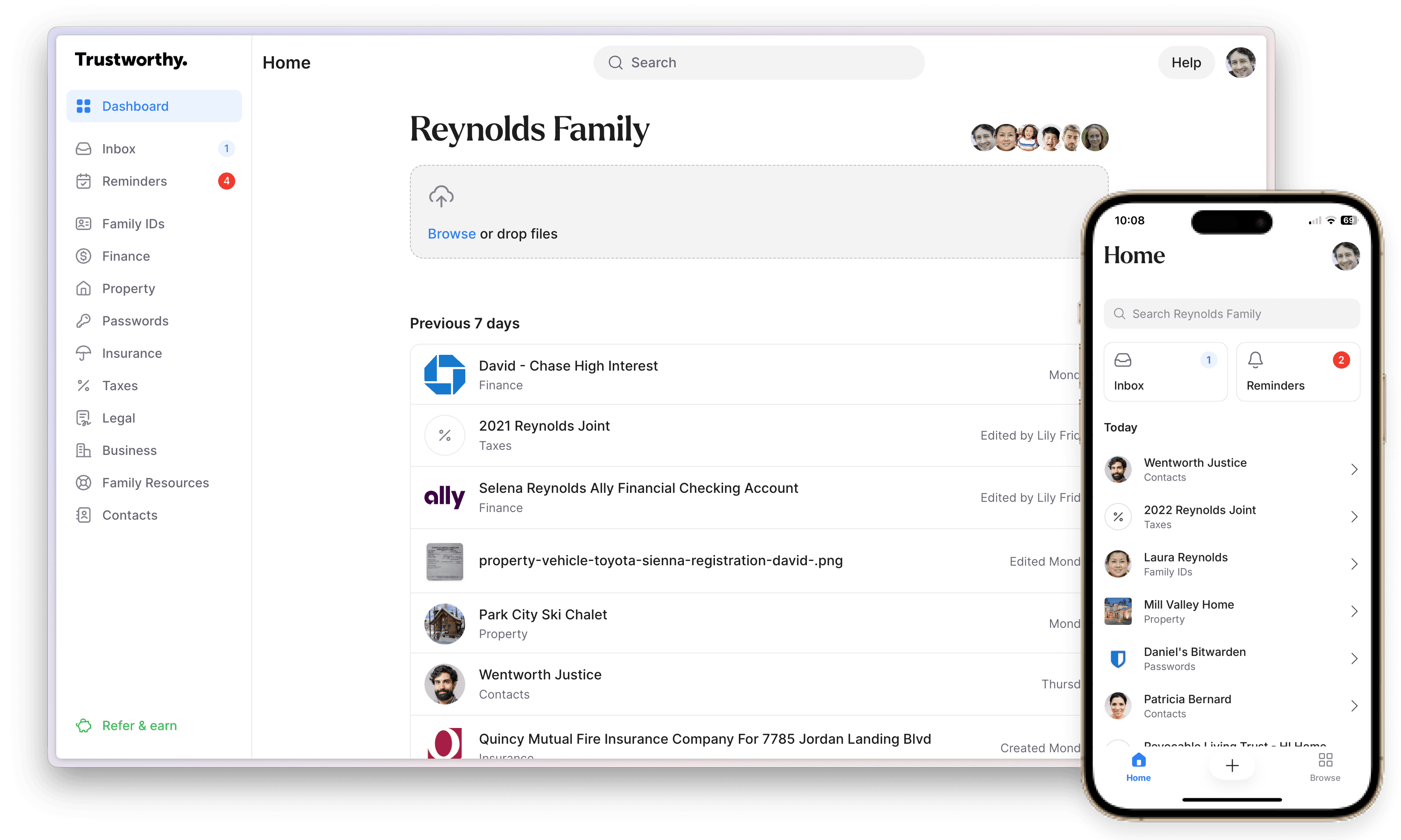
Trustworthy has a range of categories that make organization easy, including family IDs, insurance, contacts, property, finance, passwords, and legal.
Users can upload an unlimited number of documents and make use of AI-driven suggestions, and navigating those categories is a cinch, thanks to an intuitive and beautifully designed dashboard. Intelligent, automated reminders help you save on late fees, and Trustworthy’s expert service provides support and onboarding.
Trustworthy has a 4.8 "excellent" rating on review site Trustpilot.
What Is Google Drive?
Google Drive offers cloud storage to share and collaborate on files and folders from different devices. It integrates with other Google tools like Docs and Sheets, which is the main appeal of why companies and families use Google Drive for collaboration.
While both Google Drive and Trustworthy overlap as storage solutions, their overall purposes and services stand in stark contrast. We’ll compare the features of the two so you can make an informed decision about which platform is best for you.
Compare Trustworthy vs. Google Drive
Table Cell 1
Trustworthy
Google Drive
Security
AES 256-bit encryption
Available
Available
Multi-factor authentication
Available
Available
Tokenization
Available
Not available
On-screen redaction
Available
Available
Biometric authentication
Available
Available
Advanced threat detection
Available
Deploys user entity behavior analytics, alerting users to unusual or suspicious activity
Limited
Hardware key support (e.g., YubiKey)
Available
Included with Gold and Platinum plans
Available
Compliance
SOC 2 Type II
Compliant
Compliant
SOC 3
Compliant
Compliant
EU General Data Protection Regulation
Compliant
Limited
Requires Google Workspace data processing agreement
California Consumer Privacy Act
Compliant
Limited
Requires privacy controls enabled in Google Workspace
HIPAA
Compliant
Limited
Requires business associate agreement
Automation
Instant account organization
Available
Structured system automatically connects your people, documents, accounts, and assets so household information works together
Household data stays organized automatically as new documents and other information are added
Autopilot extracts key information from documents
Not available
Inbox Autopilot
Available
Automatically uploads and organizes important documents from your Gmail account, keeping your family's information up to date
New documents are automatically connected to related information in your account
Not available
Recommendation engine personalizes your account
Available
Not available
Automated expiration and renewal reminders
Available
Autopilot scans documents for deadlines and other important dates, and automatically sends reminders
Not available
AI-generated document summaries
Available
Not available
AI-powered document categorization prompts
Available
Not available
AI-powered file-name suggestions
Available
Not available
Automated backups
Available
Available
More Curation Features
Mobile document scanning
Available
Android and iOS mobile scanner captures and auto-fills information for you
Available
Desktop scanner integration
Available
Compatible with Ricoh ScanSnap scanners
Available
Chrome extension
Available
Lets you save Gmail attachments, local files and screenshots directly to your account
Available
Email forwarding to account inbox
Available
Not available
Drag-and-drop uploading
Available
Available
Collaboration & Sharing
Number of collaborators
Unlimited
Unlimited collaborators with Platinum plan
Limit varies by price tier
Unlimited
Unlimited number of collaborators can access Docs
Granular permissions
Available
Partial, full, and legacy access
Category- and document-level sharing
SecureLink™ sharing with expiration and access settings
Limited
3 permission levels
Activity feed
Available
Not available
Upload and update requests
Available
Not available
Document Storage
Unlimited storage
Available
Unlimited storage with paid plans
Limited
Premium plan capped at 2 TB; Google AI plans come with more storage but also cost more
Mobile App
iOS
Available
Available
Android
Available
Available
Offline Features
Mobile offline mode
Available
Household information can be accessed without internet; for times when connectivity is limited
Available
Information downloads
Available
Available
Customer Support
Support channels
Email, chat, phone
Hands-on customer support with paid plans
Support features vary by price tier
Email, chat, phone, SMS
Additional expert support
Trustworthy Certified Experts™
Personalized support — remotely or in person — for organizing your account, or an entire account setup done by an Expert
Available with all paid plans
Three hours of support included with Platinum subscription
Not available
Content library
Available
Large library of content with advice on important life moments
Not available
Help center content
Available
Available
Product discounts
Available
Marketplace of recommended products and services (with paid plans)
Not available
Pricing
Free starter plan
Available
Available
Paid plans
Available
Silver plan: $10/month
Gold plan: $20/month
Platinum plan: $40/month
Billed annually
Available
Paid options starting at $1.99 a month
Subscriber discounts
Available
50% military and community hero discount on Silver and Gold plans
Not available
Trustworthy’s Advanced Security Offers Peace of Mind
Both Trustworthy and Google Drive use advanced security measures like 256-bit encryption and two-factor authentication, and are SOC 2 Type 2 and SOC 3 compliant, as certified by the American Institute of CPAs.
Trustworthy's digital vault takes security even further, however, with features like biometric authentication, advanced threat detection, and tokenization. Tokenization removes sensitive data from the database and replaces it with a corresponding token, which keeps the sensitive information protected and separate from your account.
Trustworthy is also compliant with the General Data Protection Regulation (GDPR), California Consumer Privacy Act (CCPA), and Health Insurance Portability and Accountability Act (HIPAA).
Get Organized Without Doing All the Work Yourself
With Trustworthy, your family's documents are secure, organized, and ready to use.
Trustworthy’s standout SecureLinks™ feature allows you to control exactly who has access to your files and for how long by setting time limits.
All of these components, coupled with bonus features like hardware keys and on-screen redaction, make it clear that Trustworthy is the most secure digital storage solution.
Trustworthy’s Value Is Second to None
Google Drive has a free tier and subscription options starting from $2 per month. However, it lacks family-focused features like Trustworthy’s.
Trustworthy offers superior value by assisting families with comprehensive organization and security. With Trustworthy, you can choose from:
Free starter plan.
Silver: $10 a month (billed annually).
Gold: $20 a month (billed annually).
Platinum: $40 a month (billed annually), which includes three hours of access to Trustworthy Certified Experts™. Read more about them below.
Additionally, Trustworthy offers a 50% discount to firefighters, police, paramedics, EMTs, doctors, nurses, active-duty military personnel, reservists, veterans, teachers, and security guards.
Make Organization Easier With Built-In Support
Trustworthy helps manage your family's information so you don’t have to track everything.
Family-Centric Organization vs. General Cloud Storage
Trustworthy's AI-powered digital vault makes organization simple.
With Trustworthy, you don’t have to create or manage a system yourself — it’s already built in. Your people, documents, accounts, and assets are automatically connected, so everything stays aligned as a complete picture.
As new information is added, it’s instantly organized behind the scenes.
That same approach applies to your inbox. Inbox Autopilot automatically captures important documents from Gmail, organizes them, and connects them to the right places in your account, so nothing gets missed or left behind.
You can also manually forward your family’s important documents to your personalized Trustworthy email address. They'll get automatically added to your Trustworthy inbox.
Trustworthy also creates document summaries and offers suggestions for document names and filing locations — all with minimal effort. You’ll be able to retrieve important documents quickly, making the management of your family’s information hassle-free.
Trustworthy's automated reminders help members keep track of deadlines for items like payment due dates and passport expirations.
Unlike Trustworthy, Google Drive’s no-frills general file and folder structure lacks family-specific tools for staying organized.
More Trustworthy Features
Trustworthy mobile app (iOS and Android):
Scan and upload documents from your phone.
Access and share documents on the go.
Legacy access:
Allows trusted individuals to access your account when you die.
Tool integration:
Document uploads from Ricoh ScanSnap scanners.
Advanced search:
Quickly locate critical files, folders, and more, whether you’re on your computer or your phone, with just a few keystrokes.
Easy Collaboration vs. Basic Sharing
Trustworthy and Google Drive both offer easy collaboration and sharing features, however, Trustworthy shines in this department. Create and maintain a trusted network of people to share important information with, including family members and professionals like estate planning attorneys. Easily and securely share access to documents with them using the collaboration features.
After setting up your Trustworthy digital vault, you can onboard an unlimited number of collaborators. Those can be full-access collaborators (who can access everything in your vault) or partial-access collaborators (whose access is limited to certain sections or folders in your vault).
In addition, Trustworthy’s SecureLinks™ with expiration and revocation options, allow you to grant access to someone to a document even if they are not a collaborator on your account. Control who has access to the document via the link sent and how long the access will last.
Google Drive does have a simple link-sharing option. However, a lack of provided time limits or notifications results in less control over your documents.
Keep Everything Organized Without Constant Effort
Manage, secure, and share your documents in a system built for families.
Trustworthy Provides More Support
If you’re just getting started with organizing your family digital vault, you might want some extra help, which Trustworthy offers.
Trustworthy Certified Experts™ are professionals who offer personalized, one-on-one support. They can help Trustworthy users with onboarding documents and creating digital organization strategies, or even helping families choose the right lawyer or pick appropriate insurance plans.
Meanwhile, Google Drive offers basic customer support like email and chat but lacks Trustworthy’s specialized and tailored onboarding.
Trustworthy vs. Google Drive: Which Is Best for You?
Families wanting to organize important documents will benefit more from a personalized digital vault like Trustworthy's vs. Google Drive’s one-size-fits-all approach for casual storage.
Are you ready to learn more about Trustworthy? Try Trustworthy for free, and check out its impressive range of features that can help your family get and stay organized.
Key Takeaways
How do Trustworthy and Google Drive differ at a high level?
Google Drive is general-purpose cloud storage designed for file sharing and collaboration. Trustworthy is a family-focused digital assistant built specifically to organize, secure, and manage essential household information.
How do their security and compliance standards compare?
Both use AES 256-bit encryption, two-factor authentication, and are SOC 2 Type II and SOC 3 compliant.
Trustworthy adds tokenization, biometric authentication, advanced threat detection, on-screen redaction, and automatic compliance with HIPAA, the EU General Data Protection Regulation, and the California Consumer Privacy Act.
How do their organizational approaches differ?
With Trustworthy, you don’t have to create or manage a system yourself — it’s already built in.
Trustworthy's AI-powered features instantly organize your household information, ensuring your people, documents, accounts, and assets work together. Your data stays organized automatically as new documents and other information are added.
Google Drive relies on manual folder structures without family-specific organization or automation.
How do their sharing and collaboration tools compare?
Trustworthy supports unlimited collaborators with role-based permissions and SecureLinks™ for time-limited, revocable access. Google Drive offers basic link sharing and collaboration but fewer controls over access duration and notifications.
How do pricing and support compare?
Google Drive offers free storage and paid plans starting at $1.99 per month with basic support. Trustworthy offers an always-free plan plus paid tiers of $10 to $40 per month, optional Certified Expert™ support, and family-focused discounts.
We’d love to hear from you! Feel free to email us with any questions, comments, or suggestions for future article topics.