Quicken LifeHub vs. Trustworthy Digital Vault: How They Compare
Trustworthy's Family Operating System® automatically organizes your most important information and turns it into answers, guidance, and action.
A digital vault is a vital tool for uploading and organizing family documents, ensuring they’re always accessible and easy to share. With various platforms available, you can choose one that best fits your needs for staying organized.
Your options include industry leader Trustworthy and newcomer Quicken LifeHub. To help you determine which platform is the right fit for your family, we’ll compare their features, including automation, security, ease of use, pricing, customer support, and more.
Read on to see why Trustworthy is a better choice than Quicken LifeHub.
Let Trustworthy Handle the Hard Part of Organizing
Trustworthy helps maintain your family’s documents so your system stays up to date.
What Is Trustworthy?
Launched in 2020, Trustworthy’s game-changing Family Operating System® is designed to help families get (and stay) organized.
Trustworthy is a smart digital vault that streamlines and optimizes the organization process. Members with paid accounts can upload an unlimited number of important documents — and benefit from tools like customizable templates, automated recommendations, and smart reminders to ensure their families are prepared for anything life throws their way.
Innovative features like AI-driven automation and expert customer support enable Trustworthy members to maximize their storage and efficiency. Trustworthy users have given the platform an average rating of 4.8 stars ("excellent") on review site Trustpilot.
What Is Quicken LifeHub?
You may recognize the name Quicken — it’s been an accounting software brand since the 1980s. In 2024, Quicken expanded its offerings with a digital family vault.
Quicken LifeHub is a stand-alone product designed to help users organize family documents. While Quicken’s digital vault shares similar goals with Trustworthy, there are key differences to consider.
For instance, Quicken LifeHub's security features are less advanced, it offers fewer plan options, and it is accessible only via a web browser.
To make the comparison clear, let’s examine how Trustworthy and Quicken LifeHub stack up in the areas that matter most.
Compare Trustworthy vs. Quicken LifeHub
Table Cell 1
Trustworthy
Quicken LifeHub
Automation
Instant account organization
Available
Structured system automatically connects your people, documents, accounts, and assets so household information works together
Household data stays organized automatically as new documents and other information are added
Autopilot extracts key information from documents
Not available
Inbox Autopilot
Available
Automatically uploads and organizes important documents from your Gmail account, keeping your family's information up to date
New documents are automatically connected to related information in your account
Not available
Recommendation engine personalizes your account
Available
Limited
AI-powered guidance for organizing
Automated expiration and renewal reminders
Available
Autopilot scans documents for deadlines and other important dates, and automatically sends reminders
Not available
AI-generated document summaries
Available
Not available
AI-powered document categorization prompts
Available
Not available
AI-powered file-name suggestions
Available
Not available
Automated backups
Available
Not available
More Curation Features
Mobile document scanning
Available
Android and iOS mobile scanner captures and auto-fills information for you
Not available
Desktop scanner integration
Available
Compatible with Ricoh ScanSnap scanners
Not available
Chrome extension
Available
Lets you save Gmail attachments, local files and screenshots directly to your account
Not available
Email forwarding to account inbox
Available
Not available
Drag-and-drop uploading
Available
Not available
Security
AES 256-bit encryption
Available
Available
Multi-factor authentication
Available
Available
Tokenization
Available
Not available
On-screen redaction
Available
Available
Biometric authentication
Available
Not available
Advanced threat detection
Available
Deploys user entity behavior analytics, alerting users to unusual or suspicious activity
Not available
Hardware key support (e.g., YubiKey)
Available
Included with Gold and Platinum plans
Not available
Compliance
SOC 2 Type II
Compliant
Compliant
SOC 3
Compliant
Not compliant
EU General Data Protection Regulation
Compliant
Not compliant
California Consumer Privacy Act
Compliant
Compliant
HIPAA
Compliant
Not compliant
Collaboration & Sharing
Number of collaborators
Unlimited
Unlimited collaborators with Platinum plan
Limit varies by price tier
Limited
Only one co-owner plus collaborators
Granular permissions
Available
Partial, full, and legacy access
Category- and document-level sharing
SecureLink™ sharing with expiration and access settings
Limited
Edit and view access permissions for collaborators
Activity feed
Available
Not available
Upload and update requests
Available
Not available
Mobile App
iOS
Available
Not available
Android
Available
Not available
Offline Features
Mobile offline mode
Available
Household information can be accessed without internet; for times when connectivity is limited
Not available
Information downloads
Available
Not available
Document Storage
Unlimited storage
Available
Unlimited storage with paid plans
Limited
Storage capped at 30 GB
Customer Support
Support channels
Email, chat, phone
Hands-on customer support with paid plans
Support features vary by price tier
Phone, chat
Additional expert support
Trustworthy Certified Experts™
Personalized support — remotely or in person — for organizing your account, or an entire account setup done by an Expert
Available with all paid plans
Three hours of support included with Platinum subscription
Limited
Paid plan includes a 30-minute session with a Quicken expert
Content library
Available
Large library of content with advice on important life moments
Not available
Help center content
Available
Limited
Product discounts
Available
Marketplace of recommended products and services (with paid plans)
Not available
Pricing
Free starter plan
Available
Not available
Paid plans
Available
Silver plan: $10/month
Gold plan: $20/month
Platinum plan: $40/month
Billed annually
Limited
Only one plan, $1.99 a month (billed annually)
Subscriber discounts
Available
50% military and community hero discount on Silver and Gold plans
Not available
Trustworthy's Security Beats Quicken LifeHub's
Quicken and Trustworthy both prioritize document security, but Trustworthy takes it a step further.
Quicken uses AES 256-bit encryption to safeguard your family documents in transit and at rest. It also offers on-screen redaction and multi-factor authentication to ensure that only authorized users and collaborators can access protected documents.
Trustworthy matches Quicken's AES 256-bit encryption, multi-factor authentication, and on-screen redaction – but adds advanced features like biometric authentication and physical security keys.
For users who want the most robust security, Trustworthy offers a more comprehensive solution.
Next, there’s tokenization.
Trustworthy employs an advanced security method that replaces sensitive data with unique tokens, ensuring the original information is stored securely outside your Trustworthy account.
This means your sensitive data is completely separate from your account, providing an extra layer of protection. Not even some banks offer this level of security.
Get Organized Without Doing All the Work Yourself
With Trustworthy, your family's documents are secure, organized, and ready to use.
Then, there are SecureLinks™. This standout Trustworthy feature enables you to create unique, view-only access links to specific files in your Trustworthy vault. You control exactly who can access the files and for how long, giving you complete control over your shared information.
On top of that, Trustworthy offers advanced threat detection. Its user entity behavior analytics monitor for anomalies and unusual activity, ensuring you’re promptly alerted if anything suspicious happens.
Trustworthy's Compliance Standards Are Second to None
When it comes to compliance, Quicken LifeHub covers the basics, while Trustworthy goes further in several key areas.
California Consumer Privacy Act (CCPA): Both Quicken LifeHub and Trustworthy fulfill CCPA requirements.
SOC 2 Type II certification: Both platforms hold this certification, which ensures strong cybersecurity practices to protect data and confidentiality.
Trustworthy offers additional compliance features that Quicken LifeHub doesn't:
SOC 3 certification: In addition to SOC 2 Type II, Trustworthy achieves SOC 3 certification, providing an extra layer of security and transparency that exceeds industry standards.
HIPAA compliance: Trustworthy meets the stringent requirements of the Health Insurance Portability and Accountability Act, making it suitable for managing sensitive health-related data.
GDPR compliance: Trustworthy adheres to the General Data Protection Regulation, a comprehensive EU framework that's been replicated globally to safeguard consumer rights and privacy.
In summary, while Quicken LifeHub meets basic compliance needs, Trustworthy offers more robust protections, particularly for health data, international privacy laws, and advanced security certifications.
Make Organization Easier With Built-In Support
Trustworthy helps manage your family's information so you don’t have to track everything.
Trustworthy Simplifies and Streamlines Organization
Over the past few years, several new digital vaults, such as Quicken LifeHub, have entered the market, with most designed to fulfill specific purposes.
Quicken LifeHub, for instance, allows users to upload personal documents and create secure digital versions, offering a few useful automations. During the onboarding process, users can leverage pre-built checklists, categories, and item suggestions to ensure important documents aren’t overlooked.
One of LifeHub’s standout features is its integration with other Quicken products. For users of Quicken Simplifi or Quicken Classic, LifeHub can automatically sync financial documents directly into the digital vault.
However, this feature holds little value for those who don’t use Quicken regularly.
Trustworthy, on the other hand, goes beyond being a simple digital vault. As a comprehensive Family Operating System®, it offers a broader range of organizational features that deliver real functionality and value.
Trustworthy's Automatic Organization
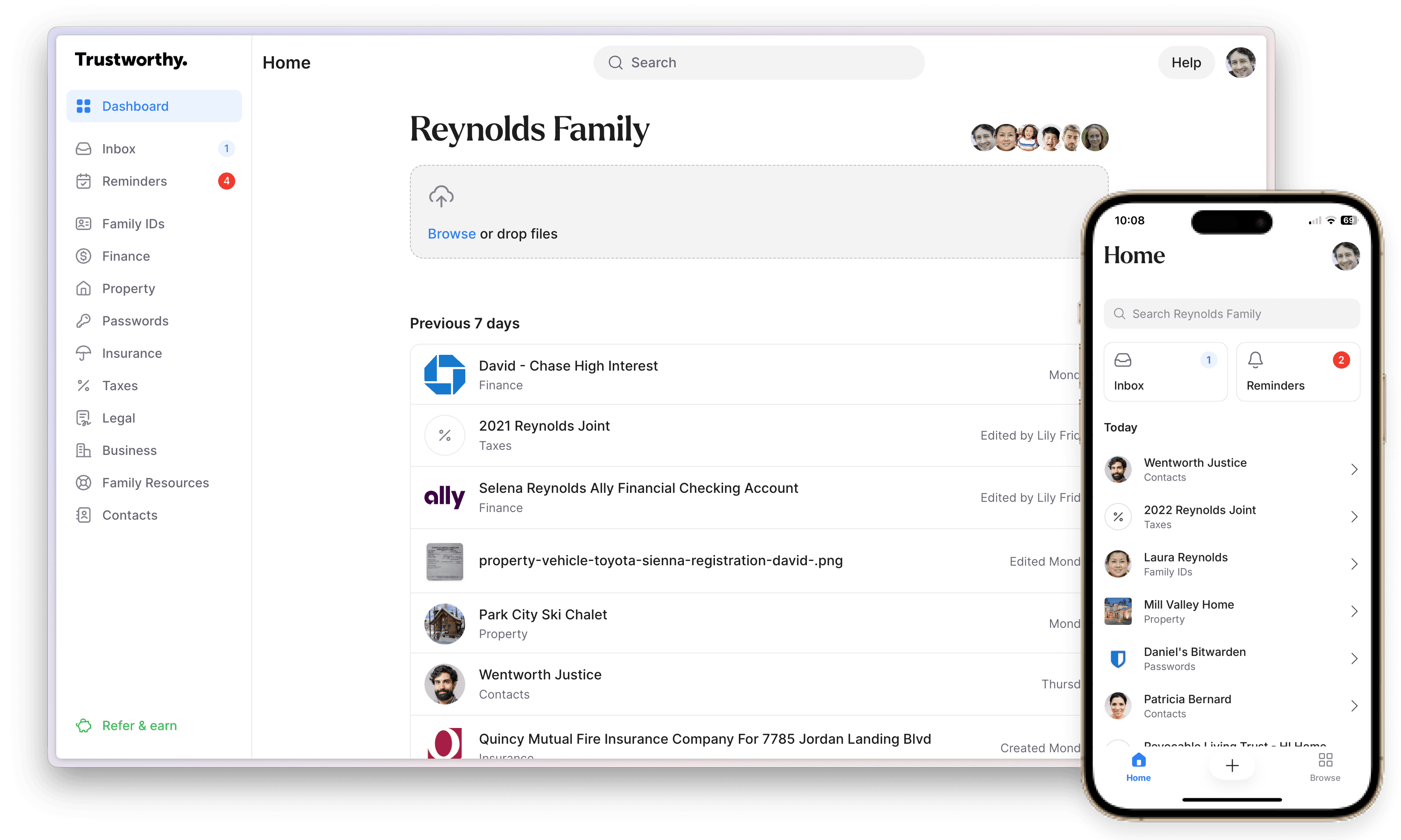
Trustworthy's Family Operating System® automatically connects people, documents, accounts, and assets so everything works together as a cohesive whole. As new information is added, it’s instantly organized in the background.
With its Inbox Autopilot, that organization extends to your email as well. Important documents from your Gmail account can be automatically uploaded, categorized, and connected to the rest of your account.
Trustworthy simplifies the organization of your family’s information by providing smart insights, summaries, and helpful suggestions for document names and filing locations. You can retrieve important documents instantly, which means that managing the family’s information is hassle-free.
Likewise, Trustworthy’s automated reminders feature gives you smart prompts to keep you on track for important deadlines —protecting you from late fees, unnecessary interest, and costs to your credit.
Trustworthy's Accessibility
Finally, there’s accessibility to consider.
Quicken LifeHub offers an intuitive dashboard, but it's limited to web browser access. This could make it challenging to quickly retrieve your insurance documents in an emergency, such as a car accident.
Trustworthy eliminates this concern with its versatile mobile app, available on iOS and Android. The app allows you to scan and upload documents directly from your phone, and access or share them on the go. This ensures your family’s important documents are always within reach when you need them most.
Additionally, for those using ScanSnap scanners, Trustworthy offers seamless integrations.
Trustworthy also provides mobile offline access, for times when internet connections are difficult, and the ability to download your information.
Additionally, Trustworthy enhances browser-based usability with its Chrome extension. The extension offers drag-and-drop functionality, making it simple to add files, save email attachments, or capture screenshots directly into your Trustworthy inbox while browsing.
Trustworthy also streamlines the process of adding documents. By forwarding your family’s important documents to your personalized Trustworthy email address, the platform automatically uploads them to your digital vault, complete with suggested names and recommended filing locations.
Quicken: Basic Pricing With Limited Service
Quicken LifeHub is priced at $1.99 per month, billed annually. However, it offers only one plan, limiting your ability to customize the level of service to fit your needs.
Additionally, Quicken LifeHub lacks several important features we’ve highlighted earlier. While it may appeal to those prioritizing cost savings over functionality, this comes at the expense of useful tools and capabilities.
If security and robust organization features are your priority, Trustworthy provides a more comprehensive solution.
Unlike LifeHub, Trustworthy has a tiered pricing system. You can choose from four plans based on the features and services you want to come with your account:
A free starter plan.
Silver: $10 a month (billed annually).
Gold: $20 a month (billed annually).
Platinum: $40 a month (billed annually), which includes three hours of access to a Trustworthy Certified Expert™.
Additionally, Trustworthy offers a 50% discount on its Silver and Gold plans to firefighters, police, paramedics, EMTs, doctors, nurses, active-duty military members, reservists, veterans, teachers, and security guards.
With Trustworthy, Storage Is Unlimited on Paid Plans
Life can be pretty messy, and you might find that you have loads of family documents, IDs, and business records you’d like to back up and organize. If that’s the case, Trustworthy wins in this department.
Trustworthy's paid plans don't cap your storage. That means you’ll have plenty of room to grow your digital vault as your family grows.
Collaboration Features: Trustworthy vs. LifeHub
One key function that both LifeHub and Trustworthy share is the ability to collaborate with other family members or professionals you work with, like a lawyer or an accountant.
With LifeHub, you can select one co-owner to your account. You can then onboard other people in your life as account editors or viewers. Editors can access or change all documents, and viewers can access specific folders or documents (but can’t make any changes).
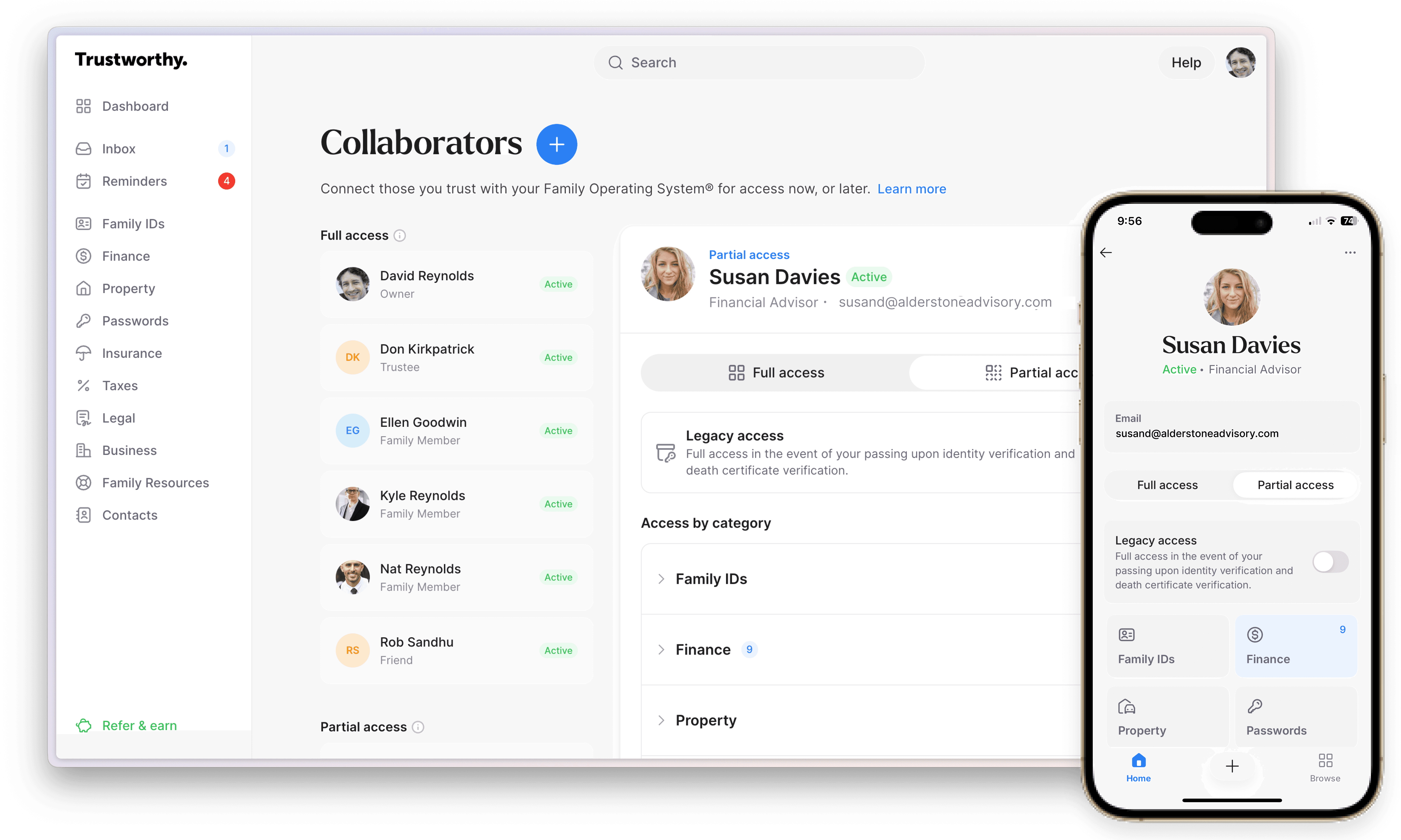
With Trustworthy, you benefit from a more granular approach to access.
As the account owner, you can onboard an unlimited number of collaborators. Those can be full-access collaborators, with the ability to view and edit everything in your vault, or partial-access collaborators (which you can limit to certain sections or folders in your vault).
But Trustworthy stands apart from LifeHub because of its unique SecureLinks™ feature. This lets you grant anyone secure access to a document — even if they’re not a collaborator on your account.
Better yet, you get to control who can access a document via the link you’ve sent and how long that access will be granted.
Finally, Trustworthy includes a legacy feature to ensure family members can access your account documents if something happens to you. That means extra peace of mind in knowing everything will be organized for your loved ones.
Trustworthy Provides More Support
Just getting started with a digital family vault? You might want a bit of extra support. So, let’s take a look at how Quicken LifeHub stacks up against Trustworthy in terms of customer service.
Quicken’s support team offers help via chat or phone, and if you need onboarding advice, you can arrange a free 30-minute appointment with a Quicken expert.
Trustworthy provides support via email, chat, or phone, with the amount of support varying by plan. For additional help, members can get access to a Trustworthy Certified Expert™.
Trustworthy Certified Experts™ are professionals who offer personalized, one-on-one support. They can assist Trustworthy users with onboarding documents and creating digital organization strategies, or even helping families choose the right lawyer or pick appropriate insurance plans.
Locate Documents Easily With Trustworthy's Search Feature
The last piece of the puzzle is ease of use. Both LifeHub and Trustworthy let you categorize your uploads. But if you need to find something quickly, Trustworthy has a leg up on Quicken thanks to its smart features.
For example, let’s say you upload an auto insurance policy to your account. Trustworthy automatically creates links from the policy to other areas within your account, such as covered drivers and covered vehicles. These smart links mean you can bring up the relevant policy by searching in several different areas.
You can even import your contacts and then link them to a file in Trustworthy. For example, you could link your mechanic to the vehicles they service or link your estate lawyer to your will or advance directive.
That means you’ll be able to easily connect with the relevant professional if anything comes up in these areas, saving you time and a whole lot of hassle.
Keep Everything Organized Without Constant Effort
Manage, secure, and share your documents in a system built for families.
Trustworthy: Your Best Option
Every family has different needs, so the perfect digital vault for you might not be the best fit for your friends or family. But when you compare all the features of Quicken LifeHub and Trustworthy, Trustworthy is the clear winner.
Both platforms give users the ability to upload and manage family documents, and they provide advanced security features and collaborative functionality.
But Trustworthy takes that functionality to the next level with its best-in-class automated features, tokenization, ease of use, granular permissions, storage, and access to Trustworthy Certified Experts™.
So, are you ready to learn more? Check out Trustworthy’s range of features and set up a free account now to discover how the Family Operating System® can help your family get (and stay) organized.
Key Takeaways
What are the main differences between Trustworthy and Quicken LifeHub?
Trustworthy offers far more automation, broader collaboration tools, greater security, mobile access, and unlimited storage with all paid plans.
LifeHub provides basic uploading and organization but lacks many of the advanced features that make Trustworthy a long-term solution for family document management.
How do their security features compare?
Both use AES-256 encryption and multifactor authentication, but Trustworthy adds tokenization, biometric login options, physical security key support, and advanced threat detection.
Trustworthy also meets SOC 3, HIPAA, and GDPR standards, which LifeHub does not.
What automations does Trustworthy provide that LifeHub does not?
A lot. For example: Trustworthy's structured platform automatically connects people, documents, accounts, and assets so everything works together as a cohesive whole. As new information is added, it’s organized in the background.
That organization extends to your email as well. Important documents from your Gmail account can be automatically uploaded, categorized, and connected to the rest of your account.
How do they differ in access, storage, and collaboration?
Trustworthy includes granular permissions, SecureLinks™ for time-limited sharing, and unlimited storage and collaborators on paid plans.
It also provides mobile apps, document scanning, email-to-account uploads, a Chrome extension, and scanner integration. LifeHub is browser-only, limits storage to 30 GB, and allows only one co-owner.
How does pricing compare?
Trustworthy offers a free starter plan and three paid plans ($10, $20, and $40 a month, billed annually), along with 50% military and community-hero discounts and the option to work with Trustworthy Certified Experts™.
LifeHub has one plan at $1.99 a month (billed annually) with fewer features and no free tier.
We’d love to hear from you! Feel free to email us with any questions, comments, or suggestions for future article topics.