Everplans vs. Trustworthy Digital Vault: How They Compare
Trustworthy's Family Operating System® automatically organizes your most important information and turns it into answers, guidance, and action.
Managing your family's information can be overwhelming. Families often need secure access to important documents, such as:
Insurance ID cards during an optometrist appointment.
Advance directives in a medical emergency.
And many others.
That's why companies like Trustworthy and Everplans have developed digital vaults to simplify family management. With numerous digital storage options available, it’s crucial to compare them before investing your time and money.
In this article, we’ll see why Trustworthy stacks up as the better choice over Everplans.
Let Trustworthy Handle the Hard Part of Organizing
Trustworthy helps maintain your family’s documents so your system stays up to date.
What Is Trustworthy?
Trustworthy’s Family Operating System® helps you securely organize, store, and share your important family information. It offers best-in-class automation to make organization easy, intelligent reminders to help avoid missed deadlines, and optional one-on-one expert service for onboarding and continued support. Trustworthy gets an overall 4.8 "excellent" rating from dozens of customers on review site Trustpilot.
What Is Everplans?
Everplans is another platform that helps organize important information, such as legal and insurance documents. It provides step-by-step guidance, secure storage, and sharing options for loved ones and advisors. Everplans doesn't have reviews on Trustpilot.
Compare Trustworthy vs. Everplans
Table Cell 1
Trustworthy
Everplans
Security
AES 256-bit encryption
Available
Available
Multi-factor authentication
Available
Available
Tokenization
Available
Not available
On-screen redaction
Available
Not available
Biometric authentication
Available
Not available
Advanced threat detection
Available
Deploys user entity behavior analytics, alerting users to unusual or suspicious activity
Not available
Hardware key support (e.g., YubiKey)
Available
Included with Gold and Platinum plans
Not available
Compliance
SOC 2 Type II
Compliant
Compliant
SOC 3
Compliant
Not compliant
EU General Data Protection Regulation
Compliant
Not compliant
California Consumer Privacy Act
Compliant
Not compliant
HIPAA
Compliant
Compliant
Automation
Instant account organization
Available
Structured system automatically connects your people, documents, accounts, and assets so household information works together
Household data stays organized automatically as new documents and other information are added
Autopilot extracts key information from documents
Not available
Inbox Autopilot
Available
Automatically uploads and organizes important documents from your Gmail account, keeping your family's information up to date
New documents are automatically connected to related information in your account
Not available
Recommendation engine personalizes your account
Available
Not available
Automated expiration and renewal reminders
Available
Autopilot scans documents for deadlines and other important dates, and automatically sends reminders
Not available
AI-generated document summaries
Available
Not available
AI-powered document categorization prompts
Available
Not available
AI-powered file-name suggestions
Available
Not available
Automated backups
Available
Not available
More Curation Features
Mobile document scanning
Available
Android and iOS mobile scanner captures and auto-fills information for you
Not available
Desktop scanner integration
Available
Compatible with Ricoh ScanSnap scanners
Not available
Chrome extension
Available
Lets you save Gmail attachments, local files and screenshots directly to your account
Not available
Email forwarding to account inbox
Available
Not available
Drag-and-drop uploading
Available
Not available
Collaboration & Sharing
Number of collaborators
Unlimited
Unlimited collaborators with Platinum plan
Limit varies by price tier
Limited
User can create a trusted network
Account deputies must sign up for Everplans
Granular permissions
Available
Partial, full, and legacy access
Category- and document-level sharing
SecureLink™ sharing with expiration and access settings
Available
Activity feed
Available
Not available
Upload and update requests
Available
Not available
Document Storage
Unlimited storage
Available
Unlimited storage with paid plans
Limited
Storage limited to only 5 GB
Mobile App
iOS
Available
Available
Android
Available
Not available
Offline Features
Mobile offline mode
Available
Household information can be accessed without internet; for times when connectivity is limited
Not available
Information downloads
Available
Available
Customer Support
Support channels
Email, chat, phone
Hands-on customer support with paid plans
Support features vary by price tier
Email only
Additional expert support
Trustworthy Certified Experts™
Personalized support — remotely or in person — for organizing your account, or an entire account setup done by an Expert
Available with all paid plans
Three hours of support included with Platinum subscription
Not available
Content library
Available
Large library of content with advice on important life moments
Available
Help center content
Available
Available
Product discounts
Available
Marketplace of recommended products and services (with paid plans)
Not available
Pricing
Free starter plan
Available
Available
Paid plans
Available
Silver plan: $10/month
Gold plan: $20/month
Platinum plan: $40/month
Billed annually
Available
Only one paid plan: $99.99/year
Subscriber discounts
Available
50% military and community hero discount on Silver and Gold plans
Not available
Comprehensive Family Management vs. Basic Legacy Tools
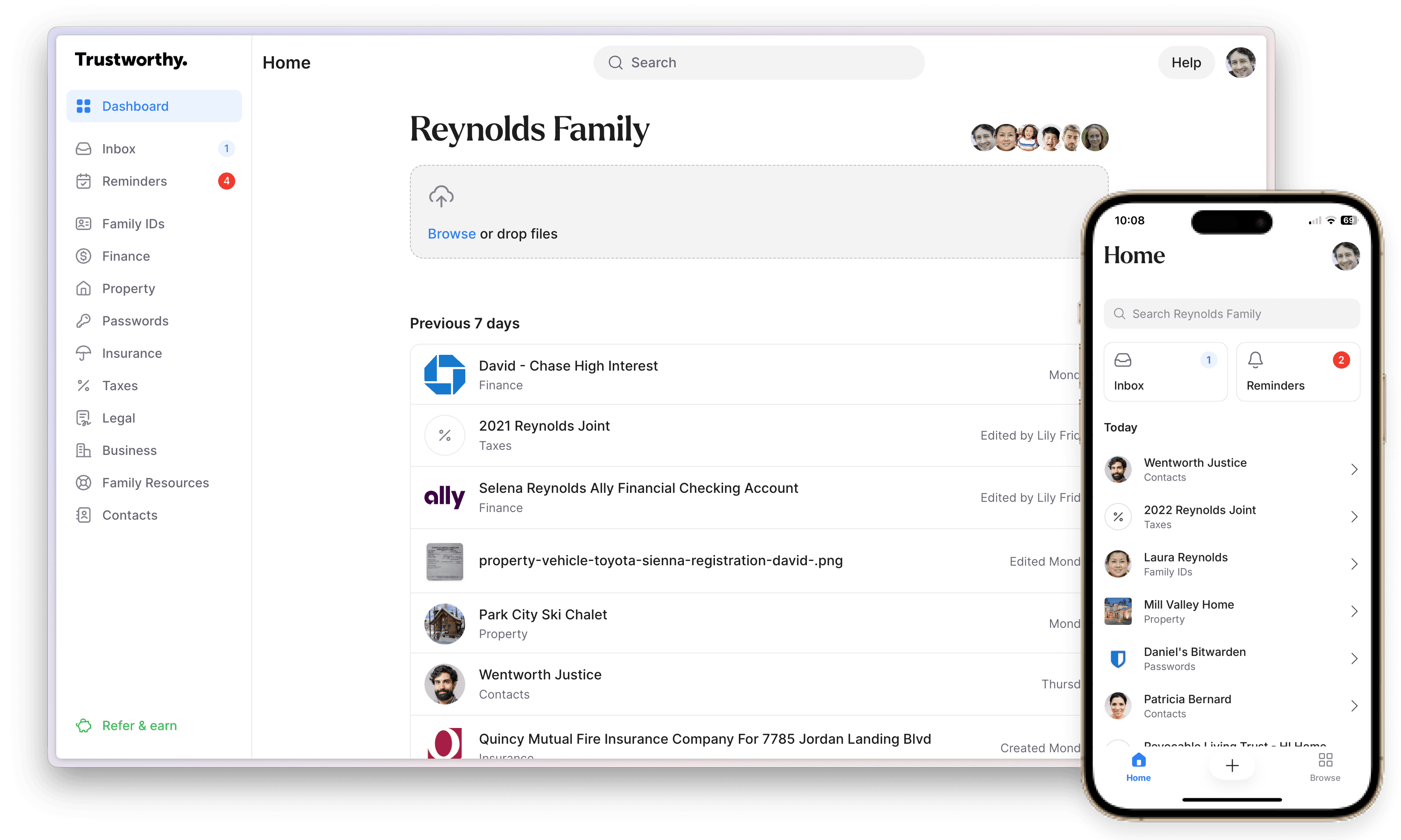
When it comes to comprehensive family management, Trustworthy outshines Everplans, which is primarily focused on legacy planning. Trustworthy offers a robust platform for managing all aspects of a family, from documents to IDs to finances, properties, passwords, insurance policies, family archives, and emergency contacts.
Trustworthy’s Autopilot system has features that make organizing and staying organized seamless.
Trustworthy keeps your household information organized without requiring you to create or manage a system on your own. Its structured platform automatically and instantly links your people, documents, accounts, and assets so everything functions together seamlessly.
As new information is added, it’s organized behind the scenes, while Autopilot extracts key details from your documents to help keep everything accurate and current.
With Inbox Autopilot, that same level of organization extends to your email. Important documents from your Gmail account can be automatically captured, categorized, and connected to the rest of your account, so new information is continually incorporated without manual effort.
Filling and file name suggestions allow users to effortlessly organize their documents. Retrieving documents is even easier with features like advanced search, smart insights, summaries, and automated reminders to update documents.
Get Organized Without Doing All the Work Yourself
With Trustworthy, your family's documents are secure, organized, and ready to use.
Trustworthy also offers a Chrome extension, allowing you to easily add files, email attachments, or save screenshots directly to your Trustworthy Inbox.
When you send your family’s important documents to your personalized Trustworthy email address, they’ll be automatically added to your Trustworthy Inbox, with suggested names and recommended filing locations.
While both platforms offer solutions for information organization, Trustworthy provides more comprehensive features tailored to family-specific needs, whereas Everplans is a simpler, more basic platform.
Unlimited Collaboration vs. Basic Sharing
Unlike Everplans, Trustworthy has impressive collaboration features that ensure families can easily share information and documents. You can create a trusted network of unlimited collaborators with defined roles for family members and professionals, such as estate planning attorneys.
Make Organization Easier With Built-In Support
Trustworthy helps manage your family's information so you don’t have to track everything.
Everplans does offer limited sharing options, but Trustworthy takes this a step further with its granular permissions using the SecureLinks™ feature.
This feature lets you grant someone access to a document even if they’re not a collaborator on your account. Keep track of who has access by controlling how long access is granted and setting up smart notifications to let you know when access is set to expire.
Trustworthy also has a legacy feature, which ensures family members can access your account if something happens to you.
Trustworthy Offers Unparalleled Security
When it comes to protecting your documents and sensitive information, Trustworthy outperforms Everplans. Both platforms use AES 256-bit encryption and multi-level authentication, and both are compliant with HIPAA and SOC 2 Type II. However, Trustworthy is also SOC 3 compliant and offers additional layers of protection.
Trustworthy's advanced security measures include tokenization, physical keys, on-screen redaction, and biometric authentication. Trustworthy is also compliant with the General Data Protection Regulation (GDPR) and the California Consumer Privacy Act (CCPA). (These measures are explained further on Trustworthy's security page.)
In addition, Trustworthy offers advanced threat detection using user entity behavior analytics, which alerts users to unusual or suspicious activity.
Cost and Value: Which Platform Is Worth It?
This is a case of you get what you pay for.
Trustworthy offers a tiered pricing system with more variety:
A free starter plan.
Silver: $10 a month (billed annually).
Gold: $20 a month (billed annually).
Platinum: $40 a month (billed annually), which includes three hours of access to Trustworthy Certified Experts™.
50% Silver and Gold discounts for firefighters, police, paramedics, EMTs, doctors, nurses, active-duty military members, reservists, veterans, teachers, and security guards.
Keep Everything Organized Without Constant Effort
Manage, secure, and share your documents in a system built for families.
Everplans only has two plans:
A limited free plan.
Premium: $99 per year.
Not only does Trustworthy offer a variety of plans, but they’re all tailored to family-specific needs and offer expert support. While Everplans may be cheaper, the basic tools lack customization for comprehensive family management.
Expert Support vs. Self-Service
When setting up your family’s organization system, you’ll likely need extra support. Both platforms offer onboarding help, but Everplans' onboarding is primarily self-service, with support available via email.
On the other hand, Trustworthy's paid plans offer expert support in the form of both email and chat. And if you’re looking for next-level support, you can get access to a Trustworthy Certified Expert™.
Trustworthy Certified Experts™ are professionals who offer personalized, one-on-one support. They can help Trustworthy users with onboarding documents and creating digital organization strategies, or even helping families choose the right lawyer or pick appropriate insurance plans.
Trustworthy Comes With Unique Benefits
Trustworthy stands out from the rest of digital storage platforms thanks to unique benefits like customizable organization and time-saving features.
Customizable organization comes with predefined family-specific categories like family IDs, property, money, business, and emergency contacts.
Adding documents and information to Trustworthy is also straightforward. Its intelligent mobile document scanner captures and auto-fills information for you, streamlining the process. You can also upload documents directly from Ricoh ScanSnap scanners. Additionally, Trustworthy's new Gmail sync can automatically pull important documents from your inbox and add them to your Trustworthy account.
Trustworthy even sets automated reminders to renew important documents and change passwords, ensuring you never forget crucial tasks.
Trustworthy is also known for its on-the-go convenience. If you forget a medical ID card, you can easily access and share it through the Trustworthy mobile app, available on iOS and Android. Everplans has only an iOS app
Why Trustworthy Is the Superior Choice
Trustworthy, founded in 2020, offers a more extensive suite of features than Everplans and outperforms other key areas like advanced security, robust sharing, customer support, and legacy planning. Trustworthy’s comprehensive platform can handle diverse needs while keeping your family organized, making it the superior choice.
If you’re ready to learn more about Trustworthy’s features, set up your free account today to uncover how it can help keep your family organized.
How Trustworthy Beats These Options
Key Takeaways
How do Trustworthy and Everplans differ at a high level?
Trustworthy is a full family-management platform with automated organization tools, automated reminders, unlimited collaboration, and expert support.
Everplans is narrower, focused mainly on legacy planning with simpler features and fewer family-specific tools.
How do their security and compliance standards compare?
Both use AES 256-bit encryption and multi-factor authentication, and are HIPAA and SOC 2 Type II compliant.
Trustworthy adds tokenization, security keys, on-screen redaction, advanced threat detection, and SOC 3, GDPR, and CCPA compliance. Everplans does not.
Do Trustworthy and Everplans offer the same features?
No. Trustworthy includes its Household Knowledge Graph (automated connections of people, accounts, documents, and assets), advanced search, automated summaries, intelligent reminders, Chrome extension uploads, smart inbox forwarding, predefined categories, and an Android/iOS app.
Everplans offers basic storage, limited guidance, an iOS-only app, and fewer tools for getting organized.
How do their sharing and collaboration options compare?
Trustworthy supports unlimited collaborators with all paid plans, granular permissions through SecureLinks™, and legacy access for designated contacts.
Everplans offers more limited sharing and lacks Trustworthy’s detailed permission controls and flexible collaboration structure.
What customer support does each service provide?
Everplans offers onboarding and email-based support. Trustworthy provides email, chat, and phone support, plus optional Trustworthy Certified Experts™ for personalized, one-on-one assistance with onboarding, organization, and broader family-management planning.
We’d love to hear from you! Feel free to email us with any questions, comments, or suggestions for future article topics.